
In This Article
Understanding No Impact on Benefit
- New Behavior for KPI Nodes:
- What Happens to Existing KPI nodes with "No Impact on Benefit":
- Migration Recommendation:
How It Works for Variable Nodes
When to Use No Impact on Benefit
Baseline vs Actual for KPI Nodes
Overview
The "No Impact on Benefit" feature allows you to include nodes in your Value Driver Tree (VDT) for tracking and monitoring purposes without affecting the initiative's overall benefit calculations. This functionality is now exclusively available through Variable nodes, which provide a configurable setting to control whether historical values should align with Actual values (No Impact on Benefit) or use the original default values from the connected KPI.
Important: The "No Impact on Benefit" option has been retired for KPI nodes. Variable nodes are now the single, standardized method for including KPI values in calculations without affecting benefit outcomes. If you have existing KPI nodes with "No Impact on Benefit" enabled, you can either switch them to "Baseline vs Actual" or leave the setting as is. However, once switched to "Baseline vs Actual," you will not be able to switch back to "No Impact on Benefit."
Note: The "No Impact on Benefit" setting affects the VDT nodes in the Variance and Benefit views. It does not affect the Baseline view.Understanding No Impact on Benefit
When "No Impact on Benefit" is applied to a node, the node continues to track and display performance values (Baseline, Target, and Actual), but changes in the node's performance do not generate calculated benefits for the initiative. This allows you to include metrics in your VDT for monitoring and informational purposes without affecting the initiative's overall benefit value.
How It Works for KPI Nodes
The "No Impact on Benefit" setting for KPI nodes has been retired. This section is provided for reference only for users with existing KPI nodes that were previously configured with this setting.:
New Behavior for KPI Nodes:
New KPI Nodes: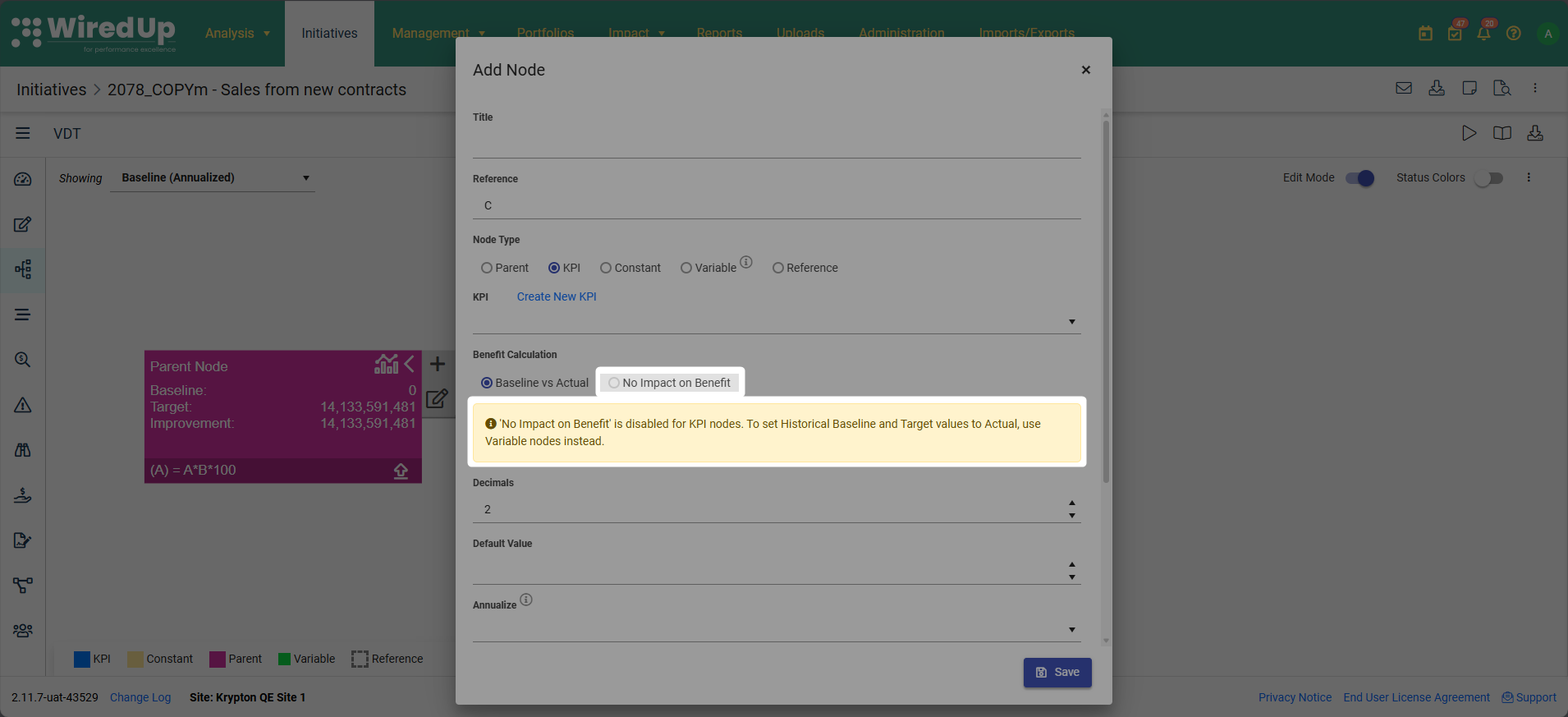
- The "No Impact on Benefit" option is disabled (appears as read-only)
- Only "Baseline vs Actual" is available as the Benefit Calculation method
- A message is displayed: "'No Impact on Benefit' is disabled for KPI nodes. To set Historical Baseline and Target values to Actual, use Variable nodes instead."
Existing KPI Nodes with "Baseline vs Actual":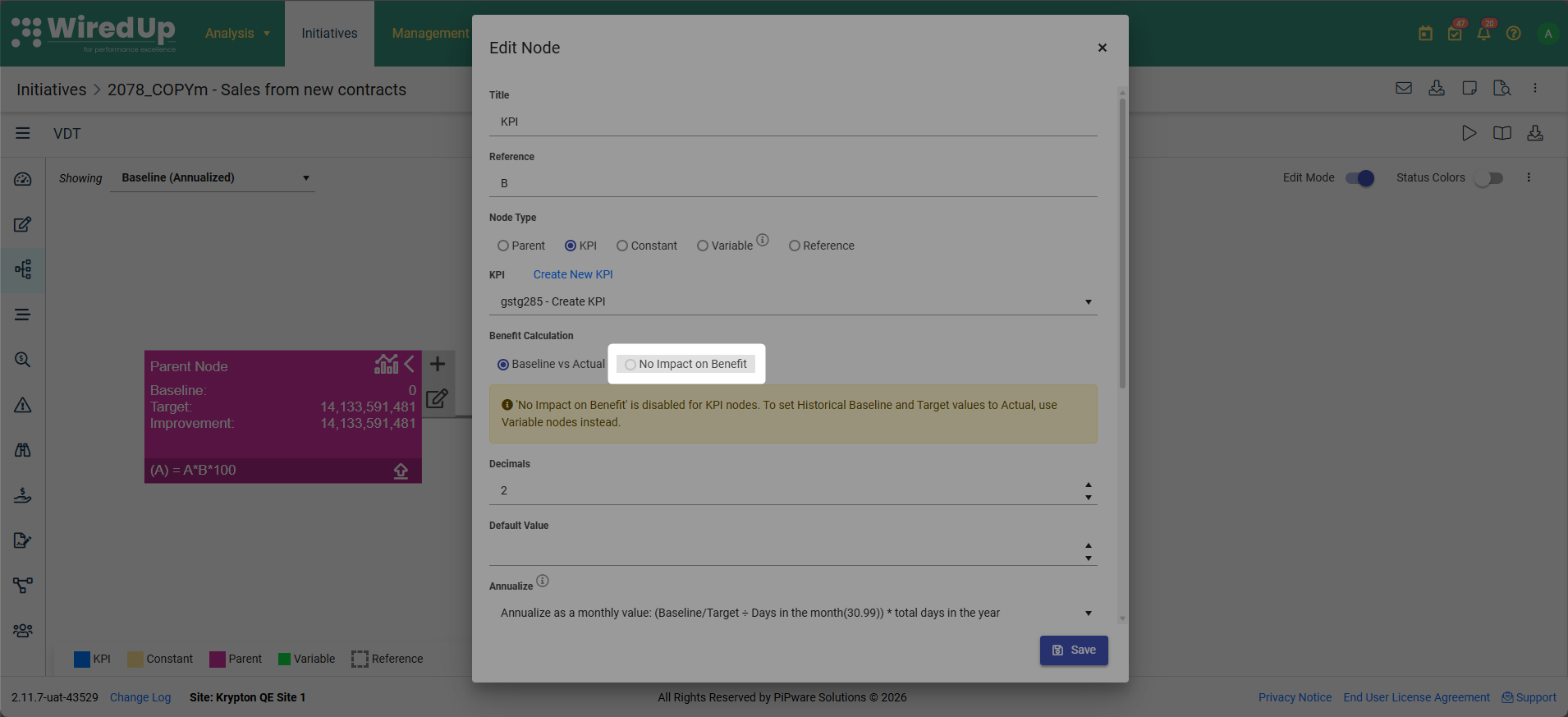
- The current selection is preserved
- The "No Impact on Benefit" option remains disabled
- Users cannot change to "No Impact on Benefit". The "No Impact on Benefit" option remains in read-only format
Existing KPI Nodes with "No Impact on Benefit":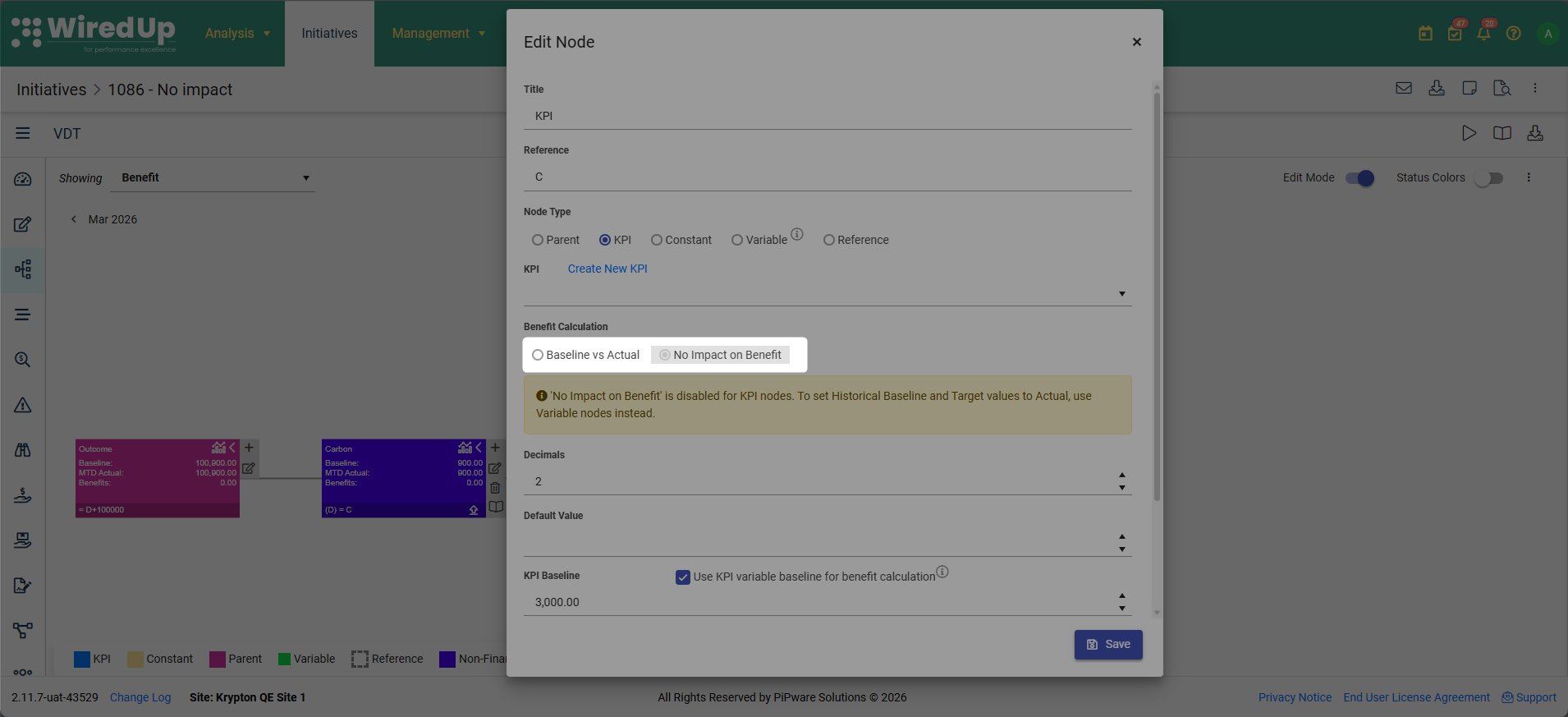
- The current setting remains active and will continue to function as is
- Users can choose to leave the setting as is or switch to "Baseline vs Actual" if needed
- This is a one-way change - once switched to "Baseline vs Actual," you cannot switch back to "No Impact on Benefit"
- To achieve "No Impact on Benefit" functionality going forward, use Variable nodes instead
What Happens to Existing KPI nodes with "No Impact on Benefit":
- In the Baseline view, the view remains the same where the Baseline and Target values are sourced as is from the KPI
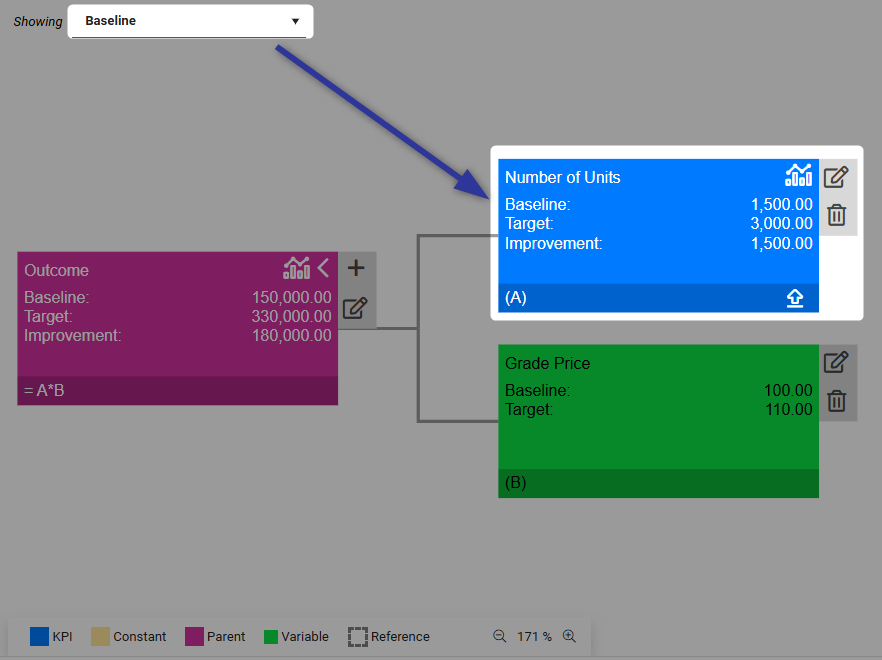
- In the Variance view, the Target value is set equal to the Actual value, resulting in no variance value for the KPI node
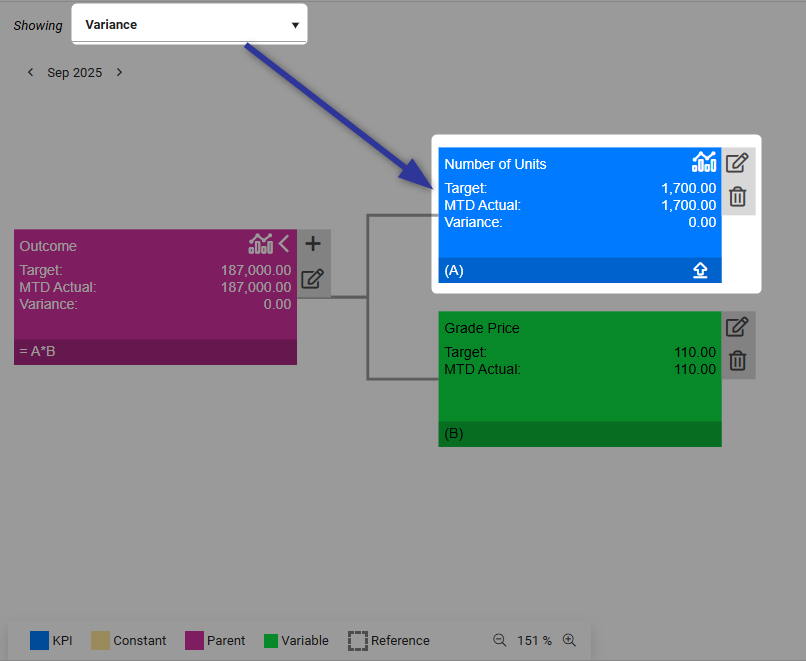
- In the Benefit view, the Baseline value is set equal to the Actual value, resulting in no benefits for the KPI node (Baseline - Actual = 0)
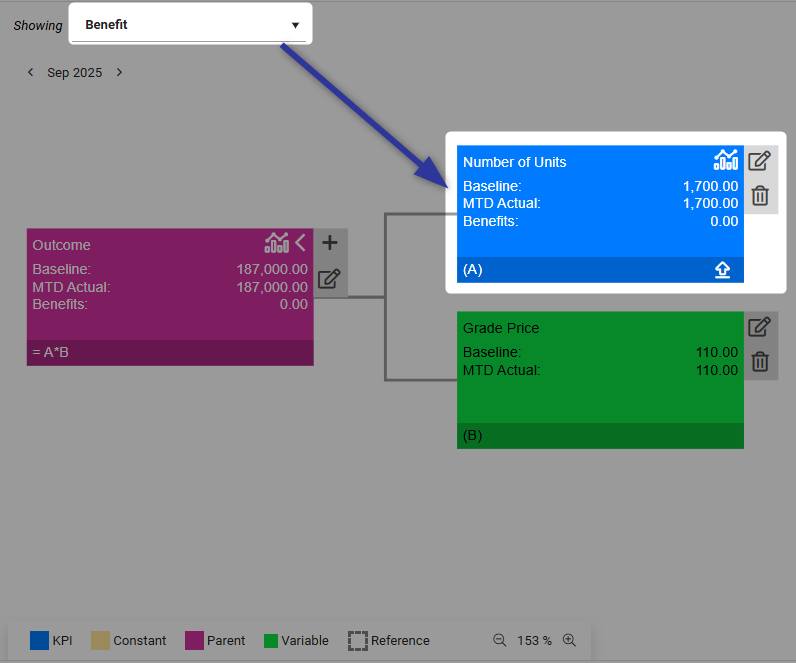
- Performance tracking remains active
- The initiative's overall benefit and variance value is not affected by the KPI node's performance
Migration Recommendation:
If you need "No Impact on Benefit" functionality for your KPI nodes:
- Create a Variable node connected to the same KPI
- Enable the "Set Historical Baseline and Target values to Actual" checkbox (enabled by default)
- Remove or convert the existing KPI node to "Baseline vs Actual"
How It Works for Variable Nodes
For Variable nodes, you can now control whether historical values should align with Actual values (No Impact on Benefit) or use the original default values from the connected KPI. This is managed through a configurable checkbox setting.
Configuring the Setting:
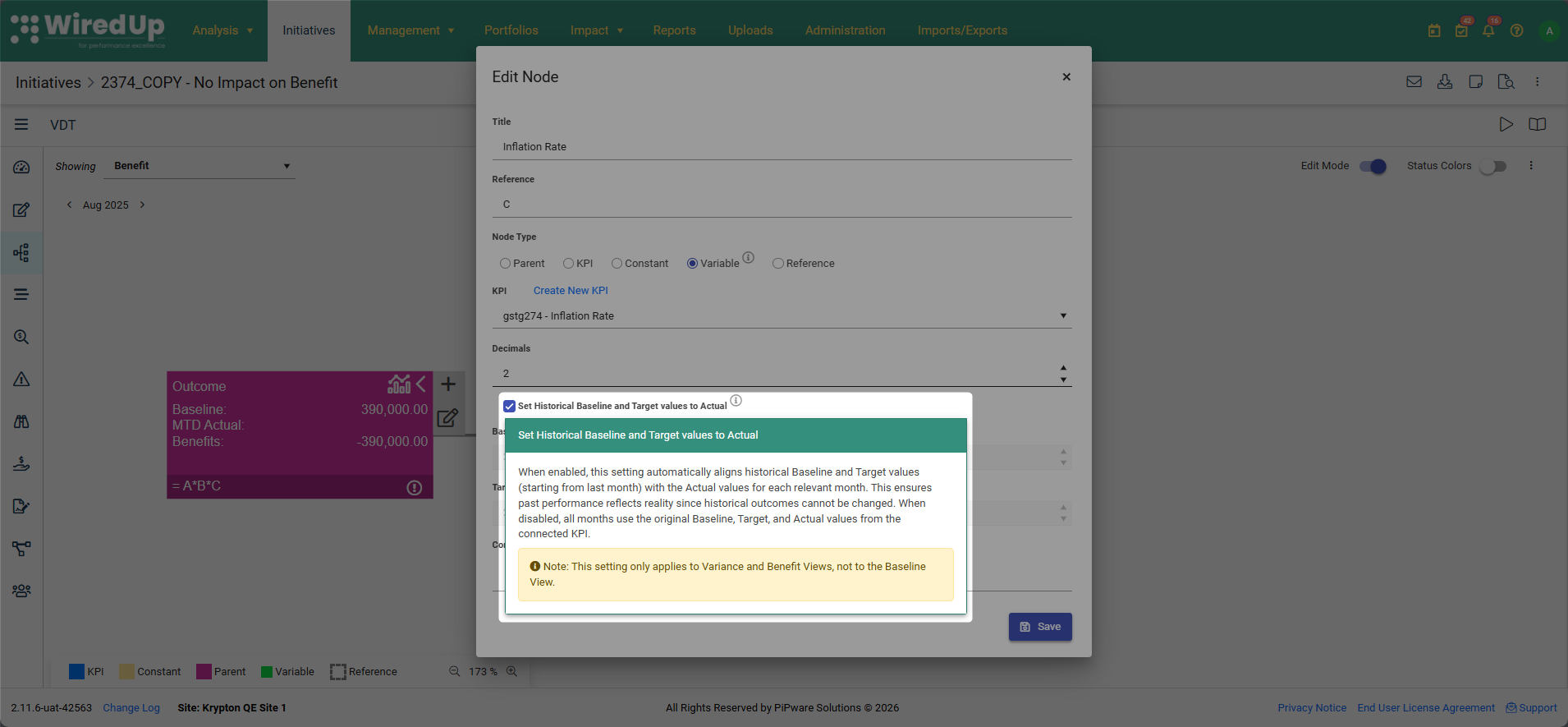
- On Edit mode of a variable node, locate the checkbox labeled "Set Historical Baseline and Target values to Actual"
- The checkbox is enabled by default (preserving the original No Impact behavior)
- To use original default KPI values for all periods, uncheck the box
- Click on the information icon (ⓘ) next to the checkbox to view the tooltip explanation
Understanding the Checkbox Behavior:
Aspect | Checkbox ON (Default) | Checkbox OFF |
Historical Months | The system automatically updates all Historical Baseline and Target Values to be the same as the historical MTD (Month-to-Date) Actual value on the Variance and Benefit view | Historical Baseline and Target values are sourced from the connected KPI |
Current and Future Months | The system displays the Variable node's current and future months' Baseline, Target, and Actual values as sourced from the connected KPI on the Baseline, Variance and Benefit view | All values (Baseline, Target, and Actual) are sourced from the connected KPI for all time periods |
Result | No variance or benefit impact from historical periods | Historical values contribute to benefit calculations using original KPI data |
How It Affects Different Views:
View | Time Period | Checkbox ON | Checkbox OFF |
Baseline View | All periods | Default Baseline and Target values sourced from the KPI | Default Baseline and Target values sourced from the KPI |
|
| The checkbox setting does not affect the Baseline view | The checkbox setting does not affect the Baseline view |
Variance View | Historical months | Target value = historical month Actual value | Target value sourced from the KPI |
| Current and future months | Target value sourced from the KPI | Target value sourced from the KPI |
Benefit View | Historical months | Baseline value = historical month Actual value (no benefits) | Baseline value sourced from the KPI |
| Current and future months | Baseline value sourced from the KPI | Baseline value sourced from the KPI |
When to Use No Impact on Benefit
For KPI Nodes:
The "No Impact on Benefit" setting is no longer available for KPI nodes. Use Variable nodes instead when you need to:
- Track a KPI's performance for monitoring purposes only
- Include a KPI that is informational and should not affect financial benefit and variance calculations
- Include a KPI in the VDT structure without influencing the initiative's value
- Track a leading indicator or reference metric rather than a direct benefit driver
For Variable Nodes:
- Enable the checkbox (Set Historical Baseline and Target values to Actual) when:
- You want to track metrics for informational purposes without historical periods affecting benefit calculations
- Historical performance should not impact current initiative benefits
- You need visual simplicity in your VDT while maintaining clean benefit reporting
- You are using Variable nodes for calculations and data flow within the VDT
Disable the checkbox when:
- You want historical values to contribute to benefit calculations
- You need to track actual performance against original targets and baselines across all time periods
- You want to use Variable nodes for their visual simplicity while maintaining full benefit calculation accuracy
- You need comprehensive variance and benefit analysis including historical periods
Baseline vs Actual for KPI Nodes
"Baseline vs Actual" is now the only available Benefit Calculation Method for new KPI nodes. Existing KPI nodes with "No Impact on Benefit" enabled will continue to function as is until the setting is changed. Once you switch an existing KPI node from "No Impact on Benefit" to "Baseline vs Actual," this change is permanent and cannot be reversed.
When using "Baseline vs Actual," the system calculates benefits by comparing the node's baseline value against its actual performance, and these benefits contribute to the overall initiative benefit value.
For "No Impact on Benefit" functionality, use Variable nodes instead of KPI nodes.
Summary
Aspect | KPI Node | Variable Node |
Setting Requirement | "Baseline vs Actual" only (No Impact on Benefit retired) | Configurable via checkbox (enabled by default) |
Can Be Changed | No - only "Baseline vs Actual" is available for new KPI nodes | Yes, checkbox can be toggled on/off |
Configuration Method | Fixed to "Baseline vs Actual" for new nodes | Via "Set Historical Baseline and Target values to Actual" checkbox |
Default Setting | "Baseline vs Actual" | Checkbox ON - "No Impact on Benefit" for historical values |
Baseline View | Default Baseline and Target values sourced as is from the KPI | Default Baseline and Target values sourced as is from the KPI |
Variance View - Target | Target value sourced from KPI (Baseline vs Actual) | Checkbox ON: Target value = MTD Actual value from KPI (historical months only) |
Benefit View - Baseline | Baseline value sourced from KPI (Baseline vs Actual) | Checkbox ON: Baseline value = MTD Actual value from KPI (historical months only) |
Historical Values | Baseline and Target values sourced from KPI | Checkbox ON: Baseline and Target automatically updated to equal MTD Actual value |
Current and Future Month Values | Baseline, Target, and Actual sourced from KPI | Baseline, Target, and Actual sourced from connected KPI (regardless of checkbox state) |
Impact on Outcome Node | Contributes to outcome node's variance and benefit values | Checkbox ON: No impact on outcome node's variance or benefit values for historical months |
Alternative Setting | None - "Baseline vs Actual" is the only option for new nodes | Checkbox can be disabled to use KPI values for all periods |